
1 / 2
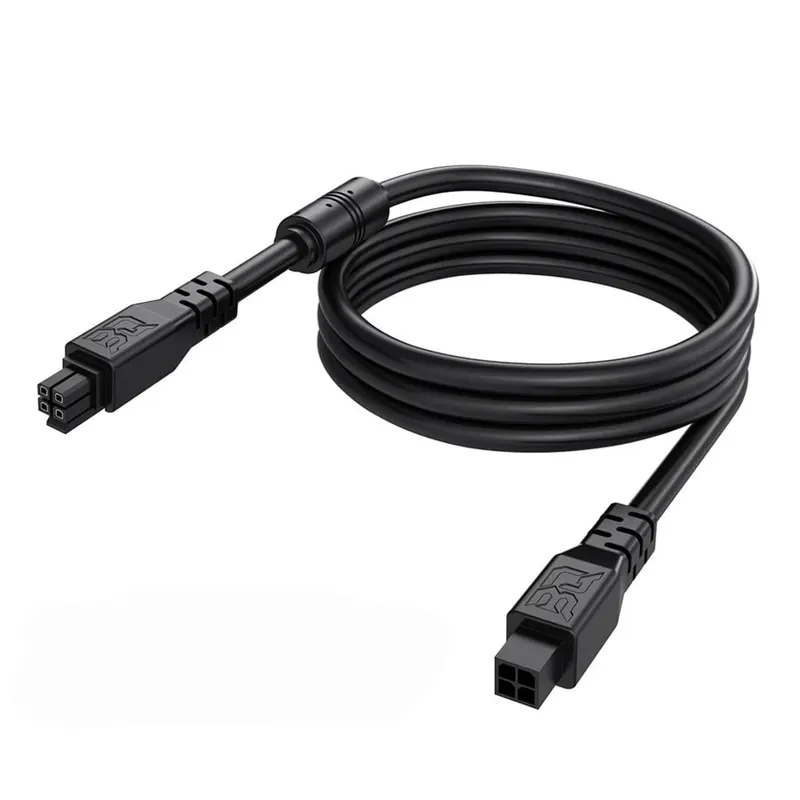
AMS lite Extension Cable 2 m
Extension 4-pin male-to-female cable with a length of 2 m for connecting the AMS Lite module to Bambu Lab A1 and A1 mini printers. Ensures full power and data transmission for RFID and automatic filament exchange when the module is placed in a cabinet or on a wall.
390 Kč
In stock
Product details
- SKU:
- WC40167
- Brand:
- Bambu Lab
- Category:
- Náhradní díly a doplňky
Product description
AMS lite 2m Extension Cable
The AMS lite 2m Extension Cable is designed for users of Bambu Lab A1 / A1 mini 3D printers with the AMS Lite module who need more flexibility in positioning the filament holder. The cable extends the original 4-pin connection between the printer and the AMS Lite, thereby allowing the AMS Lite to be moved outside the immediate vicinity of the printer (to a wall, shelf, box, or closed enclosure).
The cable carries both power and communication signals between the A1 / A1 mini and AMS Lite, so RFID reading and automatic material switching functions remain fully preserved.
Main Advantages
- Range extension by 2 meters Ideal if you need to place the AMS Lite higher, to the side, or in a separate box.
- Compatibility with Bambu Lab AMS Lite The cable is specifically designed as a 4-pin extension cable for the AMS Lite system.
- Power and communication in one Just like the original cable, it ensures the transfer of power and data signals between the printer and AMS Lite.
- Male–female connectors The cable simply plugs between the original AMS Lite cable and the printer; no intervention in the device is required.
- Flexible AMS Lite placement Allows for convenient solutions such as mounting the AMS Lite on a wall, above the printer, or in a closed cabinet without restricting the printer's movement.
Typical Use
- Building an enclosure for the Bambu Lab A1 / A1 mini where the AMS Lite is located outside the main chamber.
- Placing the AMS Lite above the printer or on a wall to save desk space.
- Longer routing from the printer for more complex workstation cabling.
Installation
- Turn off the printer and disconnect the power.
- Disconnect the original AMS Lite cable from the A1 / A1 mini printer.
- Connect the AMS lite 2m Extension Cable between the printer and the original AMS Lite cable (male–female connector).
- Check for firm insertion of the connectors – they must not be loose or rotated.
- Turn the printer back on and verify that the AMS Lite is detected and filament switching works.
For safety, we recommend always plugging or unplugging the cable while the printer is turned off.
Technical Specifications
| Parameter | Value |
|---|---|
| Purpose | Extension cable for Bambu Lab AMS Lite |
| Cable length | 2 m |
| Connector type | 4-pin, male–female |
| Function | Power + data communication |
| Compatibility | Bambu Lab AMS Lite + A1 / A1 mini |
| Color | Black / dark cable |
| Product type | Cables and connectors, AMS accessories |
Key Features for the Customer
- Set up your workspace exactly how you need it – AMS Lite no longer has to stand right next to the printer.
- Simple connection without modifications to the printer or AMS Lite.
- Suitable for enclosures, cabinets, and wall mounts for AMS Lite.
- Stable signal transmission thanks to the 4-pin cable designed for AMS Lite.
Recommendations for Use
- Ensure that the cable is not sharply bent or heavily stretched – this will extend its lifespan.
- In combination with extending the PTFE tubes for filament, you can achieve fully flexible placement of the AMS Lite away from the printer.
- If the AMS Lite is not detected after installing the cable, check the correct insertion of the connectors and their orientation.
Key Features:
- Extension cable for Bambu Lab AMS Lite with a length of 2 m
- 4-pin connection for power and communication between AMS Lite and the printer
- Male–female connectors allow for easy connection without device modifications
- Suitable for placing AMS Lite on a wall, above the printer, or in an enclosure
- Stable data transmission for RFID reading and automatic filament switching
- Practical accessory for flexible organization of the 3D printing workspace


